Showing posts with label Antonym. Show all posts

Friday, July 22, 2016

Review - Thesaurus.com

Basic & Essential Features

This site is designed for you to navigate among different words through their relationships (e.g., synonyms and antonyms).  In fact, the entire site is designed to support the exploration of these relationships. Users can search for a word to find a list of related words, including synonyms and antonyms (see Figure 1), and then continuously click on the links provided to find the related words of related words.


They also provide a free app version, which makes it handy (iOS/Android)

Link: http://www.thesaurus.com/.

Figure 1: The word 'happy' with its synonyms and antonyms.

Features for ESL Learners

If you need a definition, you can also click on the ‘see definition of (the word)’ link right next to the word and you will be redirected to the definition page on dictionary.com, as shown in Figure X. One feature that is missing from this thesaurus site is to visualize or signal the similarity and differences between all the presented synonyms and antonyms. The site does try to color-code some of the words in the synonym section in gradient based on individual relevancy to the selected word. Therefore, you can focus on those words that have heavier background first as they are considered to be more relevant. However, you have to click and read the definition of each word to know the differences.

Figure 2: Definition of the word can be found by clicking on the 'see definition of ...' link right next to the word.

Another feature that I found would be really useful for ESL learners (and maybe even general English learners) is having separate tabs for different definitions. For instance, the word 'happy' has two definitions: 'in high spirits; satisfied' and 'lucky.' The site provides a different set of synonyms and antonyms for each definition in different tabs. As a result, you can use the tab to understand how a word's meaning might be similar or dissimilar to another set of words under different definitions, as shown in Figure 2 above.

Interesting Features

Right under each tab for individual definitions, there are currently three widgets you can use to filter (or to annotate by color coding). These three widgets allow you to sort and annotate the synonyms and antonyms by their relevance, complexity (difficulty), and length, by moving the sliders to change the threshold for each scale. Those words will then be sorted and color-coded based on the thresholds you set. I found the first two filters especially interesting as you can use the first feature (relevance) allow you to see how different these words are to the word being looked up. The second feature (complexity/difficulty) allows you to color-code words by its complexity, which I take it as how advanced a word is. You can use these features to gauge the words that you could maybe master first and those words that are relatively advanced to master at that moment, as you can see in Figure 3.

Figure 3: This is an entry showing the synonyms of the word 'happy', color coded by their complexity.

Credibility

The site consists of content of the Roget's 21st Century Thesaurus, Third Edition by the Philip Lief Group. The Philip Lief  Group is a publishing company,which has been characterized by The New York Times as creating "consistent best-sellers."' As a result, I would expect the content to have some credibility.


Note:

  1. All the screenshots are taken on Thesaurus.com.
  2. This work is an extension of a course project for ELI 510 offered by the English Language Institute at the University of Michigan.
  3. Thanks to my former instructor, Pamela Bogart, who has kindly provided feedback and has helped me edit this review.

Monday, July 11, 2016

Review: Merriam-Webster Dictionary

Basic & Essential Features

This site usually provides most of what I need to know about a word from part-of-speech, definition, pronunciation (see Figure 1), synonyms, antonyms, to sample sentences.The pronunciation sample comes with good voice quality, and you can replay it multiple times, which can help you get familiar with how to pronounce the word. You can also quickly understand how to pronounce the word if you are familiar with the symbolic pronunciation coding.
They also provide a free app version, which makes it handy (iOS/Android).
Figure 1: Dictionary entry with part-of-speech, definition and pronunciation.

Features for ESL Learners

In addition to pronunciation, the site also provides information about synonyms, antonyms, origin, word root and even other words that ‘rhyme’’ with a given word (see Figure 2). One interesting and potentially useful piece of information I sometimes can get from the dictionary is the rare definition that is ‘old-fashioned’ or ‘offensive.’ As an ESL learner, I really appreciate the fact that the dictionary also preserves the history of the use of the word and it is vital for me to know whether I am using a word as it is now and whether the word is offensive when used in certain contexts.
Figure 2: The upper screenshot shows links to synonyms, antonyms, other languages for a given entry. The bottom screenshot shows origin of and the words that rhymes with a given word.

Interesting Features

Some additional features include 'saving' the word into your own list (required Facebook login) for you to return to later and a  'popularity' indicator that visualizes how many lookups on Merriam-Webster.com are dedicated to this word. I usually use the ‘popularity’ indicator (how many people look this word up) to approximate how ‘advanced’ a given word is: if a word is not popular, it is probably more advanced and is not used intensively. Otherwise, there should be a lot of people looking up this word. Of course, it is also possible that a word is too simple and well understood, so no one is looking up the word.
On the right sidebar, the site also provides ‘word of the day’, ‘trending now’, ‘browse dictionary’, and ‘word game’ and ‘quiz.’ These sections provide a way for you to go beyond your search to discover new words. The ‘browse dictionary’ is especially useful as it provides you a lens into what other words are listed before and after the word you are looking for, like what you can do if you are looking up the word in the paper version of the dictionary (see Figure 3).
Figure 3: Other words that are listed before and after a specific word in the dictionary.

Credibility

The content on this site is considered authoritative among a lot of my colleagues as it is produced by the company who produces the Encyclopedia Britannica. The definition provided by the site is occasionally cited by the researchers in my fields when they need to define a word or explain how a concept has evolved from the early dictionary definition to a more contemporary academic interpretation.

Update (as of 05/31/16)

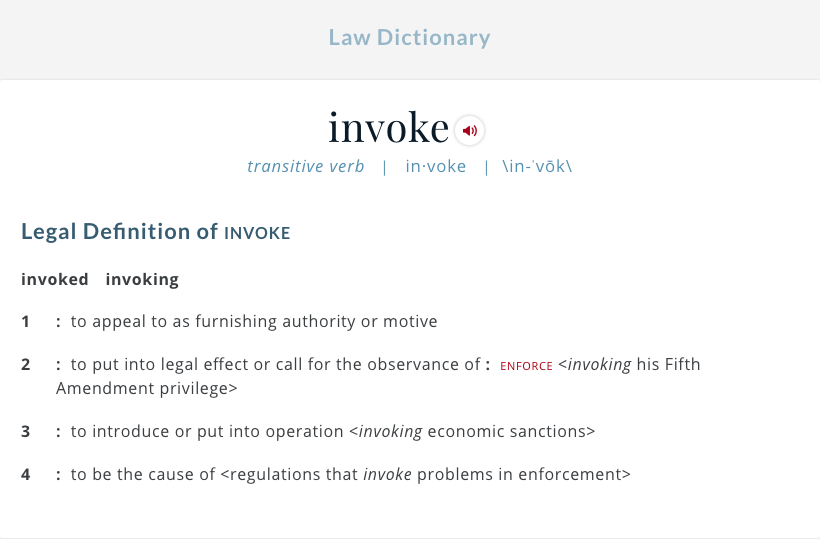
The Merriam-Webster dictionary site went through a major revision recently. The overall information architecture has changed. It now displays as an aggregated entry that combines information from various associated products, including Learner’s Dictionary, Dictionary (the main one), Dictionary for Kids, Law Dictionary, and Medical Dictionary. I found this new layout extremely useful for several reasons. First, I can selectively choose the definition that is easier to understand and progress to more advanced and thorough definition when needed. Second, vocabulary used in law and medical contexts usually require precision and have a nuanced variation on the everyday version we have used. It is useful to know, for instance, how a word is defined in the law context when you are reading articles related to government or politics (see Figure 4).
Figure 4: Same word in the Law Dictionary.

Note:
  1. All the screenshots are taken on Merriam-Webster.com.
  2. This work is an extension of the result of a course project for ELI 510 offered by the English Language Institute at the University of Michigan.
  3. Thanks to my former instructor, Pamela Bogart, who has kindly provided feedback and has helped me edit this review.